 By llew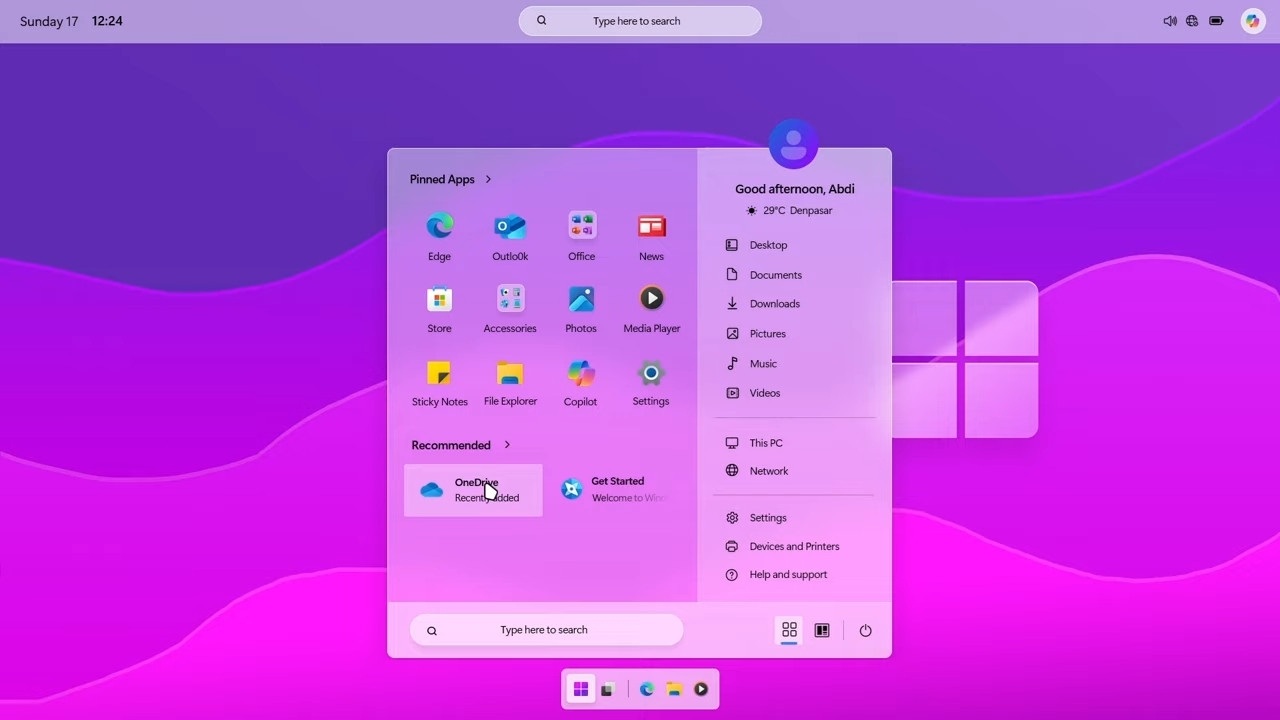
Windows has always been a backbone for creative professionals, but Windows 12 feels like a shift in direction rather than just another upgrade. It is being shaped around how people actually work today, where design, coding, editing, and content creation often happen side by side.
Creators are no longer relying on a single tool or a single workflow. A designer might use AI to generate concepts, a video editor might depend on real time rendering, and a developer might need seamless environments across devices. Windows 12 appears to recognize this change.
The biggest reason it matters is simple. It brings AI and productivity together at the system level instead of treating them as add ons. For designers, editors, and developers, that could mean less friction and more focus on actual work.
The Shift Toward AI Powered Creative Workflows

Creative work has changed rapidly in the past few years. Tasks that once took hours can now be completed in minutes with the help of AI. From generating images to writing code snippets, AI has become a silent partner in the creative process.
Windows 12 is expected to push this further by embedding AI directly into the operating system. Instead of opening separate tools, creators may be able to access smart suggestions, automation, and enhancements right from the desktop environment.
This approach is important because it reduces the gap between idea and execution. When AI is built into the system, it becomes part of everyday work rather than a separate step.
Redesigned UI Built for Creative Efficiency
One of the first things users may notice in Windows 12 is the refreshed interface. The design is expected to feel lighter, more adaptive, and focused on usability rather than just appearance.
A cleaner layout with floating elements and better spacing can make a difference during long work sessions. Creators often juggle multiple windows, tools, and files, so even small improvements in layout can save time and reduce fatigue.
The interface is also likely to adapt based on usage patterns. For example, frequently used tools or apps may become easier to access, helping users stay in their creative flow without constant interruptions.
Advanced Multitasking and Workspace Management
Multitasking is at the heart of creative work. Whether it is editing a video while referencing notes or coding while testing output, switching between tasks is constant.
Windows 12 is expected to improve snap layouts and workspace organization. Users may be able to create dedicated workspaces for different projects, keeping everything organized without clutter.
Virtual desktops could become more intelligent, allowing creators to switch between design, editing, and development environments with ease. This kind of structure helps reduce mental load and keeps projects separated in a practical way.
Built In AI Tools for Designers and Editors
For designers and editors, the most exciting changes may come from built in AI tools. These could include features like automatic background removal, smart image enhancements, and content aware editing.
Instead of relying entirely on third party software, some basic but powerful editing capabilities might be available directly within the system. This is especially useful for quick edits or early stage work.
Another benefit is smart suggestions. Imagine working on a design and receiving layout or color recommendations based on your project. These small touches can speed up workflows and even inspire new ideas.
Integration with existing creative software is also expected to improve, making it easier to move between system tools and professional applications without friction.
Performance Boost for Video Editors and 3D Creators
Performance has always been a critical factor for creators, especially those working with video and 3D content. Rendering, exporting, and processing large files can be time consuming and demanding on hardware.
Windows 12 is likely to focus on better use of GPU and system resources. This could result in faster rendering times and smoother performance during heavy tasks.
Support for high resolution workflows, including 4K and beyond, is expected to be more stable and efficient. For creators, this means less waiting and more doing, which can have a real impact on productivity.
Developer Friendly Features and Tools
Developers are also a key part of the creative ecosystem, and Windows 12 seems to acknowledge that. Improvements to tools like Windows Terminal and Dev Home could make development more streamlined.
AI assisted coding is another area of interest. Features that help generate code, suggest fixes, or optimize performance could save developers significant time.
Support for multiple programming environments is expected to improve as well. Whether someone is working with web development, app creation, or system level coding, the experience should feel more unified and flexible.
Cloud Integration and Cross Device Workflow
Modern creative work is rarely limited to one device. A project might start on a desktop, continue on a laptop, and be reviewed on a tablet.
Windows 12 is expected to enhance cloud integration, making it easier to access files and projects from anywhere. Seamless syncing ensures that work is always up to date, regardless of the device being used.
This also opens the door for better collaboration. Teams can share files, track changes, and work together without the usual complications of file transfers and version control.
Security and Data Protection for Creative Work
Creative projects often represent hours or even days of work, so protecting them is essential. Windows 12 is likely to include stronger security features designed to safeguard data.
AI based threat detection could help identify and stop potential risks before they become a problem. This is especially important for creators who handle sensitive or valuable content.
Secure file sharing is another area of improvement. Being able to share work with clients or collaborators without worrying about security adds peace of mind.
App Ecosystem and Compatibility Improvements
A strong app ecosystem is crucial for any operating system, and Windows 12 is expected to build on this foundation. Better support for popular creative software ensures that users can continue using their preferred tools.
Compatibility with older applications is also important. Many creators rely on specific versions of software, and losing access to them can disrupt workflows.
An improved Microsoft Store could make it easier to discover and install new tools, giving creators more options to enhance their work.
How Windows 12 Compares to Windows 11 for Creators
While Windows 11 introduced several visual and performance improvements, Windows 12 appears to go further by focusing on how people actually work.
The addition of system level AI, improved multitasking, and better performance makes it more than just an incremental update. For creators, these changes could translate into faster workflows and fewer interruptions.
The difference may not just be in features, but in how those features come together to create a smoother experience overall.
Potential Limitations and Early Concerns
As with any new system, there are likely to be some concerns. Hardware requirements could be higher, which may limit access for users with older devices.
There may also be a learning curve, especially with new AI features and interface changes. Early versions could have bugs or stability issues as well.
These factors do not take away from the potential of windows 12 iso file, but they are worth considering before making the switch.
Conclusion: Is Windows 12 the Future for Creators
Windows 12 has the potential to become a powerful platform for creators across different fields. By combining AI, performance improvements, and better workflow management, it aims to address real challenges faced by designers, editors, and developers.
The focus on integration rather than isolated features is what makes it stand out. When tools work together smoothly, the entire creative process becomes more efficient and enjoyable.
While it may take time for everything to mature, the direction is clear. Windows 12 is not just about doing the same things faster. It is about changing how creative work happens, and for many users, that could make all the difference.